Showing posts with label Android. Show all posts

{Solved} Deleted WhatsApp messages can still be read :: Simple Methods

How to Recover Deleted Messages in WhatsApp  ???


              WhatsApp released a feature which would enable its users to delete any message sent accidentally to another user or in a group provided the message is deleted within seven minutes of being sent. However, a new report has surfaced on the internet which claims that these deleted messages can be easily accessed.


          To access the deleted message, first, download a third party app from Google Play Store called " Antidelet ". Then just install the app and open it . The user who deleted the message will also be present in the list. Just tap on the user icon and you will be able to see the deleted message appear.

Memory full ??? try this tips to free up memory on android.....


Tips To free up memory on android


  • Clearing the cache files of larger applications and games gives many MB back. To remove cache follow following steps                                   
                                             Settings > Applications > Manage Applications then select the applications > hit clear cache button

  • Use Apps to SD                                                                                                                                           Apps to SD is the best freeware and useful tool for moving a movable application from phone memory to SD card. Apps to SD removes  application cache by a single click.                                      


  • Features of Apps to SD

                                                                                                                                                                                                                                                                                                                      ★ View all SD card capable apps and move them seamlessly
★ notify if movable apps installed
★ 1-tap to clear all app cache
★ export the app list to SD card
★ install apps from the exported app list (PRO-only)
★ home screen widget shows cache and available size
★ show app cache/data/code/total size
★ keep track of total and available storage space
★ sort through apps stored on phone and SD card
★ add movable apps to the ignore list
★ move apps back to the internal storage
★ view app on Market
★ uninstall app
★ open app
★ show app details page
★ support "Move2SD Enabler"
★ customizable notification sound, vibrate and light


Remove System Software updates of  Google Maps, YouTube, Market etc,

 
 Google maps which get updates continuously is pretty big in size, it occupies about almost 13 MB on phone memory. YouTube and market updates also have much large size one can get more space by uninstalling the same.
Follow the  following steps to uninstall updates


  • What is ONE-HANDED MODE On ANDROID Devices & How to Enable "ONE HANDED MODE"
  • Best Three Apps To Earn High Amount Money on Android..
  • Memory full ??? try this tips to free up memory on android.....


  • Best Three Apps To Earn High Amount Money on Android..
  • HOW-TO How to use Split-Screen mode in Android.....

    You can now use two apps simultaneously in split screen mode on 
    Android.. 

    Go split-screen

    To launch split-screen mode, you need to have one app open. Then, touch and hold the Intents button. You may know it as the “recent apps” button. Notice that it changes to a different icon to indicate you’re in split screen mode.

    •  Click on the "split Screen" As shown in image..
    • Then Drag & Drop the applications , you want to use.


    You have done it , NOW the Screen will appare as follows...

    How to Use Android Mobile as a webcam via USB in Windows 10 ??

    For most people a video call such as MSN or Skype, Google+ hangout or a video chat is something occasional. And when you want to start one, you need a webcam. But why spend money for a separate webcam when you can easily use your android phone's camera as a webcam ??
    With the increasing popularity of Android devices, various software is been produced for ultimate user experience. One more such software has joined this league.To the impressive list of software joins USB webcam.  One more feature one can avail using this software is to use android phone as a webcam  via USB  using simple and hassle-free easy steps.

    Here's the top apps to use Android as webcam via USB .

    1. Install Samsung Kies, so that all USB drivers required for the phone to get recognized on PC are installed.After installation  see phone is recognized when connected
    2. Install USB webcam (25 kb ) from android market or download by searching 
    3. Download and install the USB Webcam desktop client (6 MB).
    4. Connect your android phone to your computer using the USB cable and wait until the PC recognizes the device
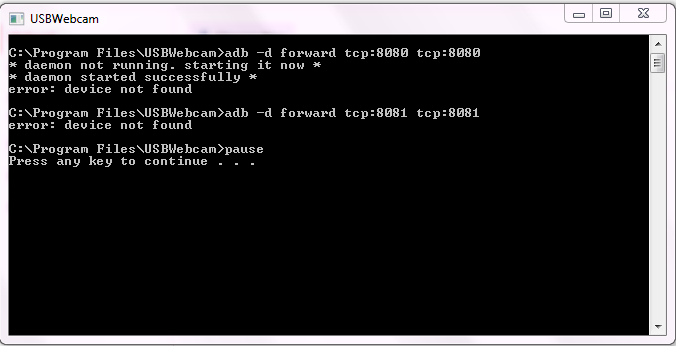
    5. Go to start menu and type "USB",  USB WEBCAM will be displayed, click on it and a DOS window will open which will look as show bellow, keep it open and don't close.  

      6. Now launch android app USB Webcam installed  on your android phone
     7. Launch any program that uses webcam like  Yahoo messenger, Msn, skype etc. and invite friends  to see you 
    NOTE: If in windows green screen appears to check out mobile and relaunch USB webcam.

     Here's the top apps to use Android as webcam via USB .

    Best math apps for Android...


    Math is a difficult subject for a lot of people. It’s totally understandable. There are a bunch of things that numbers do. People look for math apps for a variety of reasons, but most of thems are educational. Here are the best math apps for Android right now.


    Brainly is a social networking app for students. It lets people ask questions from homework assignments. Other members answer the questions with explanations on how the problem works. It works for more than just math. However, we imagine quite a few of the problems there are math related. Supported education levels include elementary school through some college. It really depends on what people on the network know. It's a free app and service. Check the Google Play Store description for a full list of available topics and subjects.CLICK HERE TO DOWNLOAD


    Graph 89 is one of the better math apps for students. It's an emulator for many popular graphing calculators. The app supports TI-83, TI-83 Plus (first and second edition), TI-84 Plus (first and second edition), TI-89, TI-89 Titanium, TI-92 Plus, and Voyage 200. Yes, that's a lot of different graphing calculators. The only difficult part is getting it to work. This is an emulator, not the actual calculators. Thus, you need to procure the software yourself. Don't worry, it's not too hard. The pro version of the app supports more calculators than the free version. CLICK HERE TO DOWNLOD

    • MyScript 

    MyScript Calculator is one of the unique math apps. It lets you write equations in the app. The app then converts it to text and solves it. It supports all of the basic operators along with bits of trigonometry, inverse trigonometry, logarithms, and constants. This is probably best for those in middle school, high school, and early college. After that, support for what you need is a bit iffy. It's one of the more entertaining math apps. However, other apps on this list give you more information and teach a little better. This is best for visual representation and homework more than actual learning.

    What is ONE-HANDED MODE On ANDROID Devices & How to Enable "ONE HANDED MODE"

    ONE HANDED MODE

    Many Large screen Devices like Samsung Galaxy J7 V / Galaxy J7 , xiaomi note 4 , xiomi mi y1 and other mi phone  comes with inbuit "ONE HANDED MODE" Feature & Which phone does not comes with one handed mode BUT  we can also enable one handed made on those devices if the device is rooted.

    First of all we will discuss whats is "One Handed Mode" & all it's features .
                     In simple way  , Supposed you are eating with your one hand and your boss asks you to mail you some kind of file , now going to wash hand and then doing would take time, instead just switch to one handed mode and do your task with one hand and enjoy your food . One handed is nothing but u can access you phone with a single hand..You can set your screen to one side of the display.

    • From a Home screen, navigate:  > Settings  > Advanced features./Additional settings >> one handed mode. > click turn on .
    To clear your confusion , see following video.

    Android Tips & Tricks You Probably Didn't Know About..........


    The Android V/S iPhone debate continues to rumble on. But one thing is certain: Google's phone software is more adapted to many different functions and customizable than Apple's offering. 


    1.    Change the Animation Scales.                                                                      There are lots of popular phones that come with slower processors and only 1GB or 2GB of RAM.One solution is to change your phone’s “Window animation scale”, “Transition animation scale” and “Animator duration scale” from 1x to 0.5x. Granted, it won’t actually make your phone faster, but it will make it feel faster.   
                (you’ll need to have first enabled Developer Mode).           Go to Settings > Developer options and scroll about two thirds of the way down the list to find the necessary options.  
    2.    Clear App Defaults.       
                                                                                                                        Go to Settings > Apps and find the app that keeps opening. Once there, scroll down to Open by default, press it, and then select Clear Defaults.
      If that doesn’t work, try doing the same with your browser app as well.
    3. Cast Your Android Screen.

     Putting your Android device's screen on a TV screen is simple, so long as you have a Chromecast-capable device. In order to mirror the screen of your Android phone or tablet, you'll need a device running Android 4.4.2 and above as well as a Chromecast-capable device.
               Typically, you can check the version of Android running on your device by going into Settings > About Phone and looking for Android version.

    • Make sure you have the Google Home app installed on your Android device.
    • You can download it from the Play Store here.
    • Ensure that you're connected to the same Wi-Fi network as your Chromecast device.
    • After opening the Google Home app, slide out the menu and select Cast Screen/Audio.
    • Tap on the blue button, followed by the device you'd like to connect to.

    Once you begin casting -- or mirroring -- your screen, an alert will appear in your notification shade, making it possible to stop mirroring with a tap.